Project Structure & Settings
This chapter explains how a SimGe project is laid out on disk and the settings you can configure.
The project file (.fap)
A project is anchored by a single .fap file — the Federation Architecture Project. It is an XML document that records the project's settings and references to its models. The .fap lives in the project's home folder and is named after the project (‹ProjectName›.fap).
Folder layout
When you create a project, SimGe builds a folder structure under the project home:
‹ProjectName›\                ← project home
├─ ‹ProjectName›.fap          ← the project file
├─ Fom\                       ← object models
│   ├─ ‹ProjectName›OM.fom    ← module index
│   ├─ ‹Module›.sfom          ← module metadata (one pair per module)
│   └─ ‹Module›.xml           ← module content
├─ Fam\                       ← federation architecture (.fam)
└─ Source\                    ← generated source code
| Folder | Holds |
|---|---|
| Fom | The object-model index (.fom) and every module's metadata/content (.sfom + .xml). |
| Fam | The Federation Architecture Module describing federate applications and the RTI execution. |
| Source | Code produced by the Code Generator. |
SimGe also uses helper subfolders (such as a temporary work area) inside the project home; you do not normally edit these by hand.
Modules are file pairs. Each module is a
.sfom(small metadata file, including the module's persistent identity) plus a.xml(the actual model content). Keeping both together in the Fom folder is what lets SimGe reload a module — see Project Explorer → Recovering Missing Module Files.
Keeping a project portable
Because module references are stored relative to the project home, you can move or copy the whole project folder and SimGe will still find the modules. If you move only part of it (for example, the .fap without the Fom folder), SimGe will flag the missing modules and help you relocate them.
Project settings
Project settings are edited from the project's settings surface. Common settings include:
| Setting | Description |
|---|---|
| Project Name | Identifies the project and drives file/folder names. Must be a valid file name — SimGe validates this and blocks saving on invalid characters. |
| Project Home Folder | The root folder; the Fom, Fam, and Source folders are derived from it. |
| Target HLA standard | The standard the project works in (IEEE 1516-2025 is the modern default). |
| Code Generator settings | Options that control code generation — see Code Generator. |
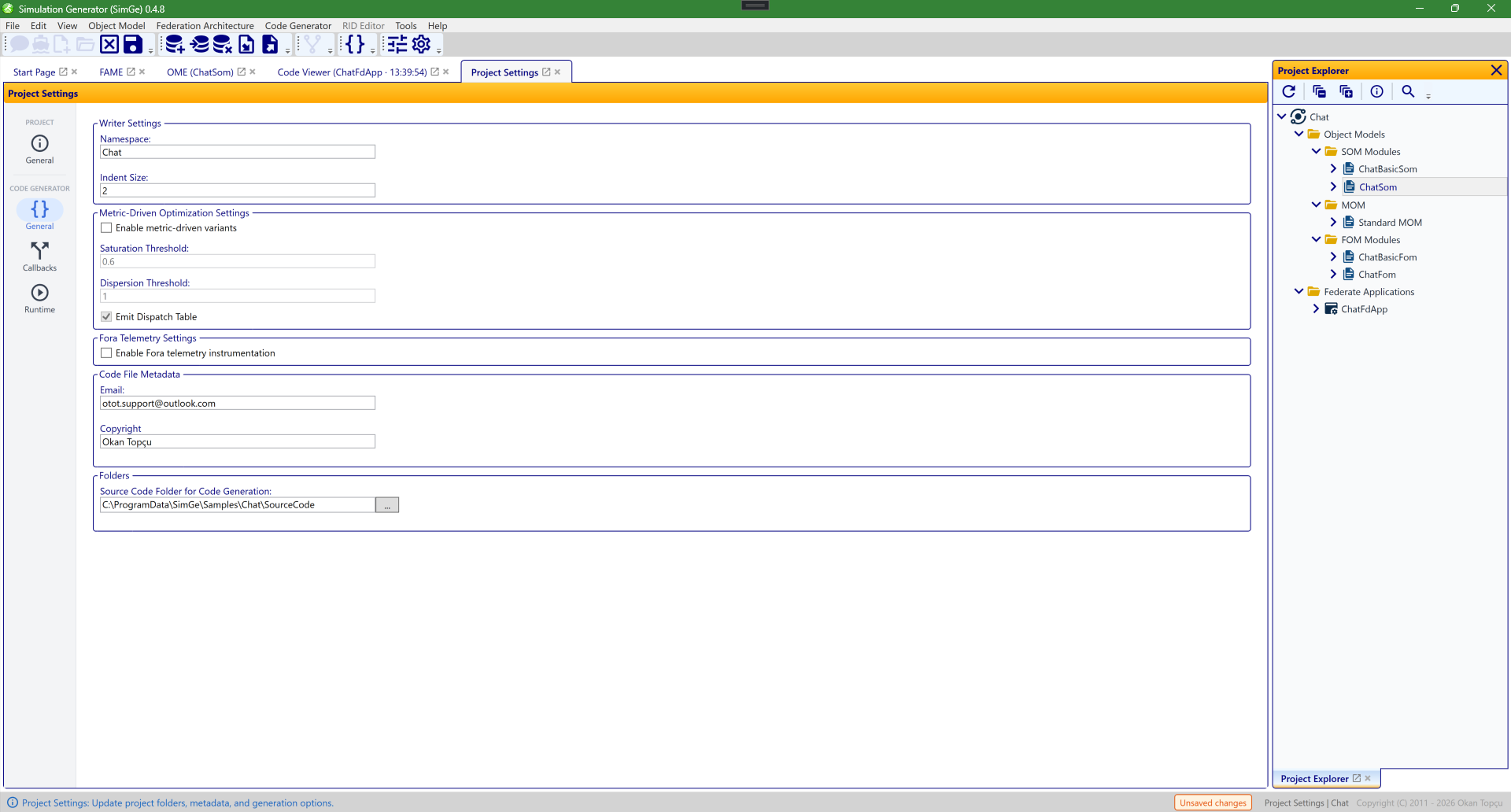
The Code Generator settings, part of the project settings. These options (writer settings, metric-driven optimization, and Fora telemetry) control how the Code Generator produces federate code. Like other settings, they are validated and a save is blocked while errors remain.
Validation guards
SimGe validates settings as you edit them. If the project settings or code-generator settings contain errors:
- The offending fields are flagged.
- Save is blocked until the errors are resolved, with a message listing what to fix.
This prevents creating folders or files with invalid names and keeps the project in a consistent, loadable state.
Next: Project Explorer
Updated June 25, 2026, 16:28:09