OME (Object Model Editor)
The Object Model Editor (OME) is the main workspace for editing a FOM or SOM module in tabular form. It combines hierarchy-oriented table views, flat property tables, and item editors for detailed OMT work.
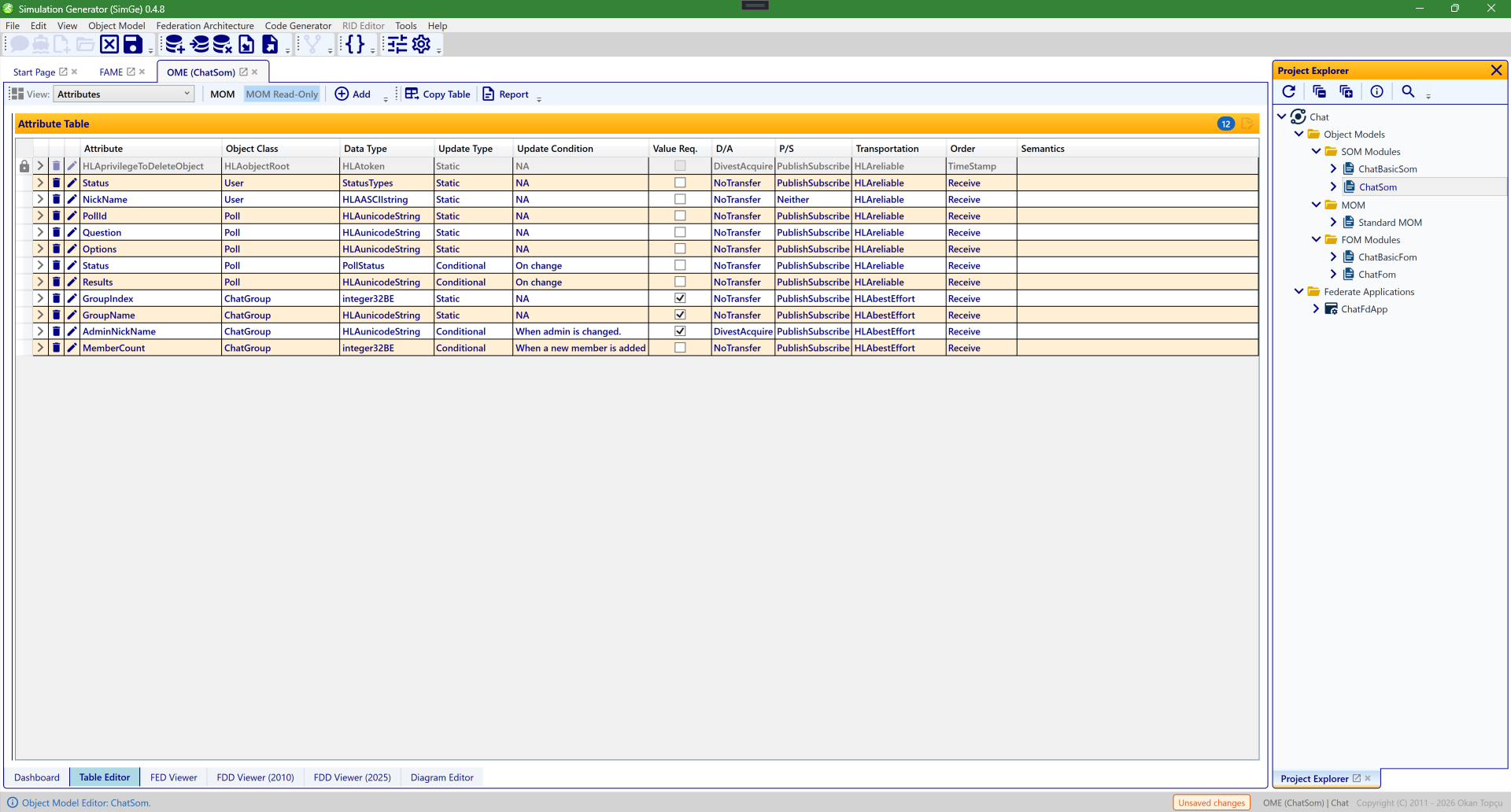
The OME table editor, here showing a module's Attribute table as editable rows (name, object class, data type, update type/condition, P/S, transportation, order, …). The toolbar's Add/edit controls adapt to what the active table supports, and double-clicking a row opens its dedicated item editor. The module workspace also carries tabs along the bottom — Dashboard, Table Editor, FED Viewer, FDD Viewer (2010), FDD Viewer (2025), and Diagram Editor — covered in their own chapters.
Workspace Scope
OME is module-scoped. Each open OME tab works on one active module and can expose:
- identification metadata
- object classes
- interaction classes
- directed interactions
- attributes
- parameters
- dimensions
- time representations
- tags
- synchronizations
- transportations
- update rates
- switches
- datatypes
- notes
- services
Changes made in OME mark the active module as modified and set the project save state to Unsaved changes until the next successful save.
Sample references in this document use the installed Chat sample under C:\ProgramData\SimGe\Samples\Chat\Fom, primarily ChatSom.xml.
1. Identification Table
The Identification table is used for module-level descriptive metadata.
Typical Information copy-table shape:
| Field | Value |
|---|---|
| Name | module name |
| Type | FOM / SOM |
| Version | semantic or project version |
| Modification Date | last model date |
| Security Classification | classification text |
| Copyright | copyright text |
| Application Domain | domain label |
| Use Limitation | limitation text |
| Purpose | purpose text |
| Description | description text |
| Other | free text |
Typical Use
Use this table when you are documenting the module itself rather than editing class structure.
Chat Sample Example
ChatSom.xml example:
| Field | Value |
|---|---|
| Name | ChatSom |
| Type | SOM |
| Version | 0.4.4 |
| Modification Date | 2026-04-24 |
| Security Classification | Unclassified |
| Application Domain | HLA General |
| Purpose | Chat Federation is a sample project for SimGe. |
| Description | Chat Federation is a sample project for SimGe. |
| Use Limitation | NA |
The same area also includes one keyword row, one POC row, and one reference row in their own sub-tables.
Add Behavior
The generic OME Add button is meaningful here only for the POC sub-view.
2. Objects Table
The Objects table is the hierarchy view for Object Classes (OC).
Typical copy-table shape:
| Name | Sharing | Semantics |
|---|---|---|
| object class name | publish/subscribe mode | class semantics |
Object Class Editor
Opening an object class from the Objects table shows the Object Class editor.
The editor covers parent, sharing, declared dimensions, directed interactions, semantics, notes, and the embedded Attributes list for attributes declared on that class.
Recommended Use
Use the Objects table and Object Class editor when working on one object class in context.
Chat Sample Example
ChatSom.xml example:
| Name | Sharing | Semantics |
|---|---|---|
HLAobjectRoot |
Neither |
root object class |
User |
PublishSubscribe |
user entity for chat participation |
Poll |
PublishSubscribe |
poll state object |
ChatGroup |
PublishSubscribe |
chat room / group state object |
Open ChatGroup when you want to review one concrete object class with several declared attributes and a different transportation policy than the default User / Poll branch.
3. Interactions Table
The Interactions table is the hierarchy view for Interaction Classes (IC).
Typical copy-table shape:
| Name | Transportation | Order | Sharing | Semantics |
|---|---|---|---|---|
| interaction class name | transportation | order type | publish/subscribe mode | semantics |
Interaction Class Editor
Opening an interaction class from the Interactions table shows the Interaction Class editor.
The editor covers parent, transportation, order, sharing, declared dimensions, semantics, notes, and the embedded Parameters list for parameters declared on that class.
Recommended Use
Use the Interactions table and Interaction Class editor when working on one interaction class in context.
Chat Sample Example
ChatSom.xml example:
| Name | Transportation | Order | Sharing | Notes |
|---|---|---|---|---|
HLAinteractionRoot |
HLAreliable |
TimeStamp |
Neither |
root interaction class |
CastVote |
HLAreliable |
Receive |
PublishSubscribe |
poll vote payload |
ChatMessage |
HLAreliable |
Receive |
PublishSubscribe |
uses dimension Group |
GroupManagement |
HLAbestEffort |
Receive |
Neither |
parent for group control interactions |
GroupManagement.JoinGroup |
HLAbestEffort |
Receive |
PublishSubscribe |
join request |
GroupManagement.LeaveGroup |
HLAbestEffort |
Receive |
PublishSubscribe |
leave request |
ChatMessage is a good example for an interaction class that also uses a declared dimension.
4. Directed Interactions Table
The Directed Interactions table shows directed interaction relationships defined on object classes.
Typical use:
- inspect which interaction classes are associated with which object classes
- review directed-interaction coverage while designing object behavior
Typical review shape:
| Object Class | Directed Interaction |
|---|---|
| class name | referenced interaction class |
Chat Sample Example
ChatSom.xml example:
| Object Class | Directed Interaction |
|---|---|
User |
HLAinteractionRoot.ChatMessage |
5. Attributes Table
The Attributes table is the flat property table for object-class attributes across the active module.
Typical copy-table shape:
| Name | Data Type | Update Type | Ownership | Transportation | Semantics |
|---|---|---|---|---|---|
| attribute name | datatype | static/conditional/etc. | ownership mode | transportation | semantics |
Attribute Editor
When an attribute editor is opened directly from the Attributes table:
- the current parent object class is shown
- parent reassignment is allowed
- the change is applied when the editor is confirmed with
OK
Recommended Use
Use the Attributes table when the task is cross-cutting:
- cleanup across many classes
- compare similar attributes
- reparent an attribute
Chat Sample Example
ChatSom.xml example:
| Name | Parent | Data Type | Update Type | Ownership | Sharing | Transportation | Order |
|---|---|---|---|---|---|---|---|
Status |
User |
StatusTypes |
Static |
NoTransfer |
PublishSubscribe |
HLAreliable |
Receive |
NickName |
User |
HLAASCIIstring |
Static |
NoTransfer |
Neither |
HLAreliable |
Receive |
PollId |
Poll |
HLAunicodeString |
Static |
NoTransfer |
PublishSubscribe |
HLAreliable |
Receive |
Question |
Poll |
HLAunicodeString |
Static |
NoTransfer |
PublishSubscribe |
HLAreliable |
Receive |
Options |
Poll |
HLAunicodeString |
Static |
NoTransfer |
PublishSubscribe |
HLAreliable |
Receive |
Status |
Poll |
PollStatus |
Conditional |
NoTransfer |
PublishSubscribe |
HLAreliable |
Receive |
Results |
Poll |
HLAunicodeString |
Conditional |
NoTransfer |
PublishSubscribe |
HLAreliable |
Receive |
GroupIndex |
ChatGroup |
integer32BE |
Static |
NoTransfer |
PublishSubscribe |
HLAbestEffort |
Receive |
GroupName |
ChatGroup |
HLAunicodeString |
Static |
NoTransfer |
PublishSubscribe |
HLAbestEffort |
Receive |
AdminNickName |
ChatGroup |
HLAunicodeString |
Conditional |
DivestAcquire |
PublishSubscribe |
HLAbestEffort |
Receive |
MemberCount |
ChatGroup |
integer32BE |
Conditional |
NoTransfer |
PublishSubscribe |
HLAbestEffort |
Receive |
This table is a good place to compare datatype and transportation choices across User, Poll, and ChatGroup.
For modular FOMs, the Data Type column also shows dependency-defined type names. For example,
NETN-CBRN.ProcessingTime displays TimeSecondInteger32 even though that datatype is declared in
RPR-Base. OME keeps the active module independent and displays its preserved XML reference; the
live datatype object is resolved when the complete module dependency closure is composed.
Data-Type Selection Dropdown (ComboBox UX)
When selecting a data type inside OME editors (such as attribute, parameter, array, fixed-record field, variant discriminant/alternative, or dimension editors), use the searchable dropdown:
- Filter as you type: Type part of a name to filter local and resolved dependency-owned types allowed by that editor. Matches are ranked exact name first, then prefix, then substring; matching text is highlighted.
- Select a result: Pick an entry or press Enter to accept the top-ranked match. The search text is not automatically replaced while you type, so
LocationStructcan be selected without being expanded toLocationStructArray. - No results: No matching data type means that no permitted type in the current catalog matches the search. Check the spelling and whether the defining dependency module is loaded.
- Categorical Grouping: Data types are automatically grouped by their kind (e.g., Simple, Enumerated, FixedRecord, VariantRecord, Array) with clear visual headers separating each group.
- Visual Badges & Color Indicators: Each type is prefixed with a colored indicator dot corresponding to its category, along with a category label badge.
- Module Attribution Badge: If the data type is dependency-owned (e.g., imported from a parent module like
NETN-BASE), a distinct module name badge is displayed next to the name to help differentiate local types from dependency types.
Case Study: Group Administration Ownership Transfer
For a concrete scenario utilizing attribute ownership transfer, consider the Group Administration coordination pattern where the administration role is managed dynamically across chat participants:
- Object Model Elements:
- Object Class:
HLAobjectRoot.ChatGroup -
Ownership Attribute:
AdminNickNamewith ownership mode set to DivestAcquire (Conditional) -
Ownership Transfer Workflow:
- Initial Ownership: The creator of a group registers the
ChatGroupobject and becomes the initial owner of theAdminNickNameattribute, gaining administrative privileges (e.g. muting users, deleting messages). - Negotiated Divestiture: When the current admin decides to hand over administrative duties to another member, they initiate a divestiture request via
NegotiatedAttributeOwnershipDivestiture. - Acquisition Request: The target user requests acquisition of the attribute via
AttributeOwnershipAcquisition. - Handover & Notification: The RTI coordinates the handover. Once confirmed, the old admin loses ownership, and the new admin is notified via the
OwnershipAcquisitionNotificationcallback. The application UI dynamically enables administrative tools only for the new owner.
6. Parameters Table
The Parameters table is the flat property table for interaction-class parameters across the active module.
Typical copy-table shape:
| Name | Data Type | Semantics |
|---|---|---|
| parameter name | datatype | semantics |
Parameter Editor
When a parameter editor is opened directly from the Parameters table:
- the current parent interaction class is shown
- parent reassignment is allowed
- the change is applied when the editor is confirmed with
OK
Recommended Use
Use the Parameters table when the task spans multiple interaction classes or requires parameter reparenting.
Chat Sample Example
ChatSom.xml example:
| Name | Parent | Data Type |
|---|---|---|
PollId |
CastVote |
HLAunicodeString |
OptionIndex |
CastVote |
HLAunicodeString |
VoterNickName |
CastVote |
HLAunicodeString |
Sender |
ChatMessage |
HLAASCIIstring |
Content |
ChatMessage |
HLAASCIIstring |
TimeStamp |
ChatMessage |
DateTime |
NickName |
GroupManagement |
HLAunicodeString |
GroupIndex |
GroupManagement |
integer32BE |
Use the flat Parameters table when you want to compare how ChatMessage and CastVote carry different kinds of payload.
As with attributes, a parameter whose datatype is declared by another FOM module displays the
preserved datatype name instead of NA or an empty value.
7. Dimensions Table
The Dimensions table is used for dimension definitions referenced by classes and properties.
Typical copy-table shape:
| Name | Data Type | Value | Semantics |
|---|---|---|---|
| dimension name | datatype | policy/value | semantics |
Use this table when maintaining routing or dimensional metadata shared across the model.
Chat Sample Example
ChatSom.xml example:
| Name | Data Type | Value | Notes |
|---|---|---|---|
Group |
integer32BE |
Excluded |
upper bound 1024, used by ChatMessage for group isolation |
8. Time Representations Table
The Time Representations table shows the module's time representation entries.
Typical copy-table shape:
| Name | Data Type | Semantics |
|---|---|---|
| logical time row | datatype | semantics |
Add Behavior
The generic OME Add button is intentionally disabled in this table.
This is expected behavior. New entries are not created from the generic top-level add path in this view, and the toolbar button should appear visibly disabled while this table is active.
Chat Sample Example
ChatSom.xml example:
| Name | Data Type | Semantics |
|---|---|---|
LogicalTime |
HLAfloat64Time |
standardized float HLA time type |
LogicalTimeInterval |
HLAfloat64Time |
standardized float HLA time interval |
9. Tags Table
The Tags table shows user-supplied tag entries.
Typical copy-table shape:
| Name | Data Type | Semantics |
|---|---|---|
| tag name | datatype | semantics |
Add Behavior
The generic OME Add button is intentionally disabled in this table.
This is expected behavior. The table supports inspection and editing, but not generic top-level creation from the main toolbar, and the toolbar button should appear visibly disabled while this table is active.
Chat Sample Example
ChatSom.xml example:
| Name | Data Type | Notes |
|---|---|---|
sendReceiveTag |
QoS |
user-supplied runtime metadata for SendInteraction / ReceiveInteraction |
10. Synchronizations Table
The Synchronizations table is used for synchronization point definitions.
Typical copy-table shape:
| Name | Capability | Semantics |
|---|---|---|
| sync label | capability | semantics |
Synchronization Editor
The synchronization editor is used for:
- label
- tag datatype
- capability
- semantics
- notes
Label Naming Rules
Synchronization point labels (Name property) must conform to standard HLA OMT identifier rules:
- Case-Sensitive Uniqueness: Sibling labels must be unique within the module.
- Valid Characters: Labels must start with a letter (A-Z, a-z) or underscore (_), followed by letters, digits (0-9), underscores, or hyphens (-).
- Reserved Prefix: User-defined labels must not start with the reserved prefix "HLA" (case-insensitive).
- Reserved Value: Labels must not be exactly the sentinel value "NA" (case-insensitive).
Use this table when defining federation-level synchronization coordination data.
Chat Sample Example
ChatSom.xml example:
| Name | Data Type | Capability | Notes |
|---|---|---|---|
poll |
HLAunicodeString |
RegisterAchieve |
label format poll-{pollId} |
Its semantics describe a poll lifecycle label format such as poll-{pollId}.
Case Study: Distributed Polling Coordination
For a concrete scenario using synchronization points, consider the Distributed Polling coordination pattern where a participant initiates a poll and synchronizes votes across the federation:
- Object Model Elements:
- Object Class:
HLAobjectRoot.Poll(attributes:PollId,Question,Options,Status,Results) - Interaction Class:
HLAinteractionRoot.CastVote(parameters:PollId,OptionIndex,VoterNickName) -
Synchronization Point: A dynamic synchronization point labeled
poll-{pollId} -
Coordination Workflow:
- Start Poll: The initiator registers a
Pollobject instance and updates its attributes (Status = Open). - Register Sync Point: The initiator registers a federation synchronization point with the label
poll-{pollId}targeting the set of active users. - Vote & Achieve: Participants discover the
Polland receive the synchronization point announcement. They submit their vote viaCastVoteinteractions, and immediately callSynchronizationPointAchievedfor the labelpoll-{pollId}to signal completion. - Federation Synchronized: Once all members have voted/achieved, the RTI triggers the
FederationSynchronizedcallback on the initiator. - Freeze & Clean up: The initiator closes the poll (
Status = Closed), updates final results, and deletes thePollobject instance, resetting the state for subsequent polls.
11. Transportations Table
The Transportations table manages transportation definitions used by interaction classes and attributes.
Typical copy-table shape:
| Name | Reliability | Semantics |
|---|---|---|
| transportation name | yes/no | semantics |
Use this table when maintaining the transport definitions referenced elsewhere in the model.
Chat Sample Example
ChatSom.xml example:
| Name | Reliability | Notes |
|---|---|---|
HLAreliable |
Yes |
Provide reliable delivery of data in the sense that TCP/IP delivers its data reliably |
HLAbestEffort |
No |
Make an effort to deliver data in the sense that UDP provides best-effort delivery |
You can cross-check here why User and Poll attributes use HLAreliable, while ChatGroup attributes and GroupManagement interactions use HLAbestEffort.
12. Update Rates Table
The Update Rates table manages update-rate definitions.
Typical copy-table shape:
| Name | Rate | Semantics |
|---|---|---|
| update rate name | numeric/rate text | semantics |
Use this table when the model requires explicit reusable update-rate definitions.
Chat Sample Example
ChatSom.xml example:
| Name | Rate | Semantics |
|---|---|---|
| no rows | no rows | valid empty table |
13. Switches Table
The Switches table shows switch definitions.
Typical review shape:
| Switch | State |
|---|---|
| switch name | enabled/disabled |
Add Behavior
The generic OME Add button is intentionally disabled in this table.
The toolbar button should appear visibly disabled while this table is active.
Chat Sample Example
ChatSom.xml example:
| Switch | State |
|---|---|
attributeScopeAdvisory |
enabled |
attributeRelevanceAdvisory |
enabled |
objectClassRelevanceAdvisory |
enabled |
interactionRelevanceAdvisory |
enabled |
14. Datatypes Table
The Datatypes table groups multiple datatype categories under one area.
Covered categories:
| Category | Typical copy-table columns |
|---|---|
| basic data representations | Name, Size, Interpretation, Endian, Encoding |
| simple datatypes | Name, Representation, Units, Resolution, Accuracy, Semantics |
| enumerated datatypes | Name, Representation, Semantics |
| array datatypes | Name, Element Type, Cardinality, Encoding, Semantics |
| fixed-record datatypes | Name, Encoding, Semantics |
| variant-record datatypes | Name, Discriminant, Discriminant Type, Encoding, Semantics |
| reference datatypes | model-dependent reference rows |
Typical use:
- define reusable data foundations before assigning them to attributes, parameters, tags, or synchronization points
- inspect cross-category datatype dependencies
This is one of the most important tables in day-to-day model authoring.
Datatype change impact (delete / rename)
Because a datatype is usually referenced from many places, changing one can affect far more than the type itself. When you delete a datatype, SimGe analyzes the whole model and, if anything still references it, the delete-confirmation dialog reports:
- how many references, across how many classes, will break, and
- a sample of the affected elements (for example
Aircraft.Position (attribute),TrackStruct.location (record field),LocationArray.element (array element)).
Those referrers do not disappear — they fall back to an unresolved type name, which blocks code generation until you repoint them or restore the type. The warning is informational: you can still confirm the deletion, or cancel and repoint the references first. When nothing references the type, the dialog says it is safe to remove.
Renaming a referenced datatype shows a similar confirmation first. In-module references follow the rename automatically, but references to the old name from other (dependent) modules and any already-generated code do not — so you can proceed or cancel with that in view.
You can also inspect this at any time without changing anything: right-click a datatype in the Project Explorer and choose Show Impact / Usages for the same report — the elements that reference it, what a removal/rename would break, and what a representation/encoding change would force to be regenerated.
The same reference graph powers the Data-Type Impact section of the analysis report, which ranks every datatype by how far its change would reach — see Model Metrics & Reports.
Chat Sample Example
ChatSom.xml reuse map:
| Datatype | Category | Example Use |
|---|---|---|
DateTime |
simple | ChatMessage.TimeStamp |
integer32BE |
simple | dimension Group, parameter GroupIndex |
PollStatus |
enumerated | Poll.Status |
StatusTypes |
enumerated | User.Status |
QoS |
enumerated | sendReceiveTag |
HLAASCIIstring |
array | User.NickName, ChatMessage.Sender, ChatMessage.Content |
HLAunicodeString |
array | sync poll, Poll.*, GroupManagement.NickName |
SynchPointFederate |
fixed record | synchronization-related support type |
15. Notes Table
The Notes table is the central place for project/module notes stored in the active model.
Typical copy-table shape:
| Name | Semantics |
|---|---|
| note name | note text |
Use this table when maintaining textual documentation assets across the model.
Chat Sample Example
ChatSom.xml example:
| Name | Semantics |
|---|---|
MOM1 |
The value of the Dimension Upper Bound entry for the Federate dimension is RTI implementation dependent. |
16. Services Table
The Services table is used for service usage declarations.
Typical review shape:
| Section | Service | Used | Callback |
|---|---|---|---|
| service chapter | service name | yes/no | yes/no |
Add Behavior
The generic OME Add button is intentionally disabled in this table.
The toolbar button should appear visibly disabled while this table is active.
This table is mainly for validation and standards-alignment review.
Chat Sample Example
ChatSom.xml example subset:
| Section | Service | Used | Callback |
|---|---|---|---|
4. Federation Management |
createFederationExecution |
yes | no |
4. Federation Management |
joinFederationExecution |
yes | no |
5. Declaration Management |
publishInteractionClass |
yes | no |
5. Declaration Management |
subscribeObjectClassAttributes |
yes | no |
Table View vs Editor
Use the two surfaces for different tasks:
- Table View Best for scanning many rows, sorting, and making small field edits quickly.
- Editor Dialog Best for structural changes or when several related fields must be reviewed together before commit.
Typical End-User Pattern
- browse in
ObjectsorInteractions - open the class editor for structural work
- use
AttributesorParameterstables for cross-cutting cleanup - use
Datatypes,Dimensions,Transportations, orUpdate Ratesas supporting definition tables - save once the module reaches a stable state
If you are working on one class in isolation, prefer the class editor. If you are comparing many properties across multiple classes, prefer the flat table views.
For the Chat sample, a typical walkthrough is:
- open
Objectsand inspectUser,Poll, andChatGroup - open
Interactionsand reviewChatMessageandGroupManagement - switch to
Attributesto compareStatus,NickName,MemberCount, andResults - switch to
Parametersto compareChatMessage.ContentandCastVote.OptionIndex - use
Dimensions,Tags,Synchronizations, andDatatypesas supporting definition tables
Embedded Editors in Class Editors
The embedded Attributes list inside the Object Class editor and the embedded Parameters list inside the Interaction Class editor behave more conservatively than the top-level flat tables.
Parent Reassignment Rule
Those embedded lists are part of the outer class editor's draft state. If nested attribute or parameter editors were allowed to change parent immediately, the nested dialog could mutate the live model even when the outer class editor is later cancelled.
To preserve correct OK / Cancel behavior:
- opening an attribute editor from
Object Class -> Attributesshows the current parent but does not allow changing it - opening a parameter editor from
Interaction Class -> Parametersshows the current parent but does not allow changing it
If you need to move an attribute or parameter to another parent class, use the dedicated top-level Attributes or Parameters table instead of the embedded list.
Save and Cancel Semantics
The commit boundary depends on where the editor is opened:
- Top-level table item editor
OKcommits that item edit immediately. - Object Class / Interaction Class editor
OKcommits the class draft and its embedded local edits together. - Cancel Cancels the active editor scope and leaves the model unchanged for that scope.
In practice:
- cancelling an
Object Classeditor discards its class-level draft changes - cancelling an
Interaction Classeditor discards its class-level draft changes - cancelling a nested attribute or parameter dialog does not commit changes from that nested dialog
Practical Guidance
- Use
Identificationfor module documentation. - Use
ObjectsandInteractionsfor class-structure design. - Use
AttributesandParametersfor cross-cutting property maintenance. - Use
Datatypesbefore assigning complex properties. - Use
Synchronizations,Transportations, andUpdate Ratesfor reusable infrastructure definitions. - Save the project after a set of structural edits so the shell state returns to
All changes saved.
Next: Diagram Editor
Updated September 14, 2026